Not all sessions need more channels. Sometimes they need another fader throw, an isolator within easy reach, or space to connect one more instrument.
This comparison of the DJM-V10, DJM-V10-LF, euphonia, and DJM-V5 starts with a question: how do you want to build your mix? All four offer tools for shaping sound, but each organizes the channels, equalization, and effects differently. Choosing means finding the one that fits your gestures and audio sources, not counting features.
The four mixers at microFusa
Pioneer DJ DJM-V10

View the DJM-V10 at microFusa: product page, price, and availability
Pioneer DJ DJM-V10-LF

View the DJM-V10-LF at microFusa: product page, price, and availability
AlphaTheta euphonia

View euphonia at microFusa: product page, price, and availability
AlphaTheta DJM-V5

View the DJM-V5 at microFusa: product page, price, and availability
Four mixers and four ways to organize your session
The Pioneer DJ DJM-V10 combines six channels, four-band equalization, per-channel compression, and a crossfader. The DJM-V10-LF retains its architecture but replaces the 45 mm channel faders with 60 mm ones and omits the crossfader.
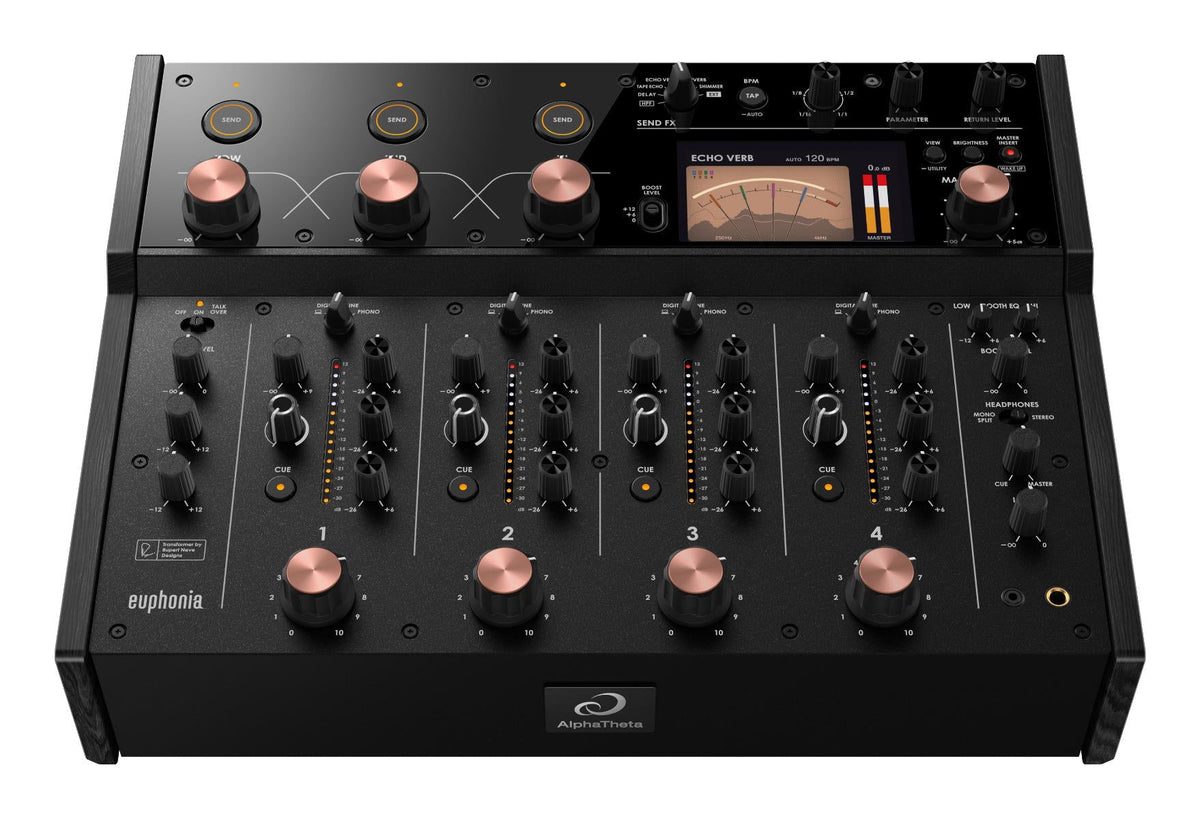
The AlphaTheta euphonia features four channels with rotary level control and a three-band master isolator. The AlphaTheta DJM-V5 incorporates part of the V10 design into three channels, with four-band EQ, compressors, and 60 mm faders.
Channels, equalization, and faders: what changes under your hands
| Feature | DJM-V10 | DJM-V10-LF | euphonia | DJM-V5 |
|---|---|---|---|---|
| Channels | 6 | 6 | 4 | 3 |
| Channel level control | 45 mm fader | 60 mm fader | Rotary | 60 mm fader |
| Per-channel EQ | 4-band | 4-band | 3-band | 4-band |
| Per-channel compressor | Yes | Yes | No | Yes |
| Crossfader | Magvel Fader | No | No | No |
| Channel fader curves | 3 types | 3 types, LF-specific | Rotary control | 3 types |
| Master isolator | 3-band | 3-band | 3-band with Boost Send | No |
With six channels, you can dedicate inputs to players, turntables, and instruments without relying on a two-source setup. If you alternate a full track, a drum machine, and another musical layer, it is best to count how many signals you will need open at once before deciding.
The four-band EQ divides the mids into two zones. This allows you to adjust in more detail how vocals, melodies, and percussion coexist. Per-channel compression, present in the V10, V10-LF, and V5, adds another tool for working with sources of different dynamics; it does not replace proper gain staging.
DJM-V10 or DJM-V10-LF: the difference is in the gesture
According to AlphaTheta's official support, the LF's functional differences are the longer channel faders, their specific curves, and the absence of a crossfader. The rest of the features remain.
Our criterion: if you use the crossfader, the V10 retains that option. If you build transitions exclusively with the channel faders, the LF offers more physical throw to adjust the level. It is not a mandatory upgrade: they are two ways to control the same mixing architecture.
euphonia: rotary level and isolator as performance tools
On euphonia, the volume of each channel is controlled by turning a knob. Its master isolator allows you to act on the lows, mids, and highs of the whole mix, with selectable maximum boost levels of 0, +6, or +12 dB.
The Boost Send function allows you to send one band of the isolator to the effects while turning its control. You can, for example, work an effect on the mids and keep the other hand available for mixing. The boost needs headroom: more gain does not automatically equal a better mix.
DJM-V5: three channels and long throw
The V5 combines 60 mm faders with three channels. According to AlphaTheta, it takes up approximately 30% less surface area than the V10 and retains tools such as the four-band EQ and per-channel compressor. Its Soft Mix Curve mode applies a subtle high-end attenuation as the fader is lowered, designed to facilitate gradual transitions.
It fits if three simultaneous sources cover your session and you want to save space in the booth without giving up that type of control. If you already need four independent signals, the number of channels must outweigh the size.
Effects: Beat FX and Send FX are not the same
The reference table indicates 14 Beat FX on the V10 and V10-LF, with X-Pad and selection of the frequency bands over which the effect operates. It includes Delay, Echo, Ping Pong, Spiral, Helix, Reverb, Shimmer, Flanger, Phaser, Filter, Trans, Roll, Pitch, and Vinyl Brake.
On euphonia and V5, the table indicates zero Beat FX. That does not mean they lack effects: their approach is built around sends.
The manufacturer documents five spatial effects on euphonia: Delay, Tape Echo, Echo Verb, Reverb, and Shimmer, in addition to a high-pass filter. Each channel has a send control, and you can also integrate an external unit.
The V5 offers six Send FX: Short Delay, Reverb, Shimmer, Tape Echo, PingPong, and Echo-Verb. Its filters include LPF, HPF, and Cross Pass. The choice should not be reduced to the number of effects: how you apply them and how much control you want to dedicate to them during the session matters.
V10 and V10-LF add to the Beat FX an architecture of sends and returns with Multi I/O and two EXT connections. euphonia adds a connection for external effects and a master insert; V5 has one external send and one return.
Connections: check your equipment before choosing
| Connection | DJM-V10 | DJM-V10-LF | euphonia | DJM-V5 |
|---|---|---|---|---|
| LINE RCA Inputs | 6 | 6 | 4 | 3 |
| PHONO RCA Inputs | 4 | 4 | 4 | 3 |
| Coaxial S/PDIF Digital Inputs | 6 | 6 | 4 | No |
| USB Type A | 1 | 1 | No | No |
| USB Type B | 2 | 2 | No | No |
| USB Type C | No | No | 1 | 2: Multi I/O and PC/Mac |
| MASTER XLR | Yes | Yes | Yes | Yes |
| Additional MASTER RCA | Yes | Yes | No | No |
| MASTER Digital Output | AES/EBU via XLR | AES/EBU via XLR | No | No |
| BOOTH | 6.35 mm TRS | 6.35 mm TRS | 6.35 mm TRS | 6.35 mm TRS |
| BOOTH EQ | 2-band | 2-band | 2-band | 2-band |
| REC OUT RCA | Yes | Yes | Yes | Yes |
| Mic Inputs | 2 | 2 | 1 | 1 |
| Mic EQ and Talkover | 2-band and yes | 2-band and yes | 2-band and yes | 2-band and yes |
| Headphone Sections | Two, with two connectors each | Two, with two connectors each | One, with two connectors | One, with two connectors |
LINE and PHONO inputs do not represent additional channels: they are connection options for the available channels. And two USB-C do not mean two equivalent computer connections. On the V5, AlphaTheta expressly distinguishes Multi I/O and PC/Mac.
For shared sessions, the two headphone sections of the V10 and V10-LF are a practical difference. The V5 adds an integrated SonicLink transmitter for wireless monitoring with compatible headphones, such as the HDJ-F10; it is not a conventional Bluetooth output.
Processing and sound: the numbers need context
The provided comparison attributes to the four mixers 96 kHz and 64-bit floating-point mixing processing, 32-bit dithering, A/D and D/A conversion, a LINE response from 20 Hz to 40 kHz, and signal-to-noise ratios of 105 dB on LINE and 88 dB on PHONO. It also includes a 96 kHz and 24-bit audio interface.
These are data from different sections: the 64-bit internal processing does not mean that the USB interface records at 64 bits. It should also not be interpreted that all the converters of each circuit work at 32 bits. For example, the V5 manual specifies 32-bit conversions for certain inputs and outputs and 24-bit for others.
euphonia also incorporates a transformer circuit developed jointly with Rupert Neve Designs. The manufacturer presents it as part of its combination of digital processing and analog character. It is a design difference, not a proof of sonic superiority or a listening impression of microFusa.
In visualization, the table includes 3.5-inch touchscreens on the V10 and V10-LF, a 4.3-inch screen on euphonia, and OLED on the V5. To decide, think about what information you need to consult without interrupting the mix.
Which mixer fits your way of mixing?
DJM-V10: our option if you need six channels, extensive connections, and want to keep the crossfader alongside layer mixing tools.
DJM-V10-LF: if you are looking for that same architecture, mixing with the channel faders and preferring a long throw to adjust the inputs and outputs.
euphonia: if four channels cover your equipment and you want a rotary surface with the isolator and sends integrated into your way of performing the session.
DJM-V5: if three channels are enough and you value the long faders, the four-band EQ, and the Send FX on a mixer that takes up less surface area than the V10.
Frequently Asked Questions
What is the difference between the DJM-V10 and the DJM-V10-LF?
The V10-LF has 60 mm channel faders, specific curves, and does not include a crossfader; the V10 uses 45 mm faders and does have a crossfader. The official support indicates that the other functions are the same. Therefore, the decision should start with how you regulate the level during a transition, not by assuming that LF means more features.
Can PHONO inputs be counted as extra channels?
No: PHONO inputs are connections for turntable signals, not additional channels. A three-channel mixer still allows mixing three channels even if it has three pairs of LINE and three pairs of PHONO. Before buying, distinguish how many pieces of equipment you will leave connected from how many sources you need to hear and control simultaneously.
Can a mixer without Beat FX have built-in effects?
Yes: euphonia and DJM-V5 incorporate internal effects by send even though the comparison marks zero Beat FX. In a send system, you regulate how much of each channel feeds the effect. It is also advisable to check how the processed signal returns and how you would connect your external effects, because that organization conditions the use during the session.
Do two headphone connectors equal two independent pre-listens?
Not necessarily: two connectors can belong to the same monitoring section. In this comparison, V10 and V10-LF have two headphone sections, while euphonia and V5 present one section with two connectors. If you mix with another person, check the independent controls of each section and not just the number of jacks.
Choose based on your equipment, not just the spec sheet
Tell us how many sources you use, how you mix, and what effects you want to connect. At microFusa, we help you decide online or with the same equipment in our stores in Barcelona and Madrid. The next step is to ask for advice with your specific configuration: so we can assess which mixer you truly make the most of and what connections you need.
Sources of the comparison
The technical basis is the captures of the comparison table provided for this article. The nuances about faders, effects, and connections have been contrasted with the official information of DJM-V10-LF, the support on differences between V10 and V10-LF, the official product page of euphonia, and the official product page of DJM-V5. The recommendations by profile are microFusa's editorial criteria, not conclusions from a listening test.